
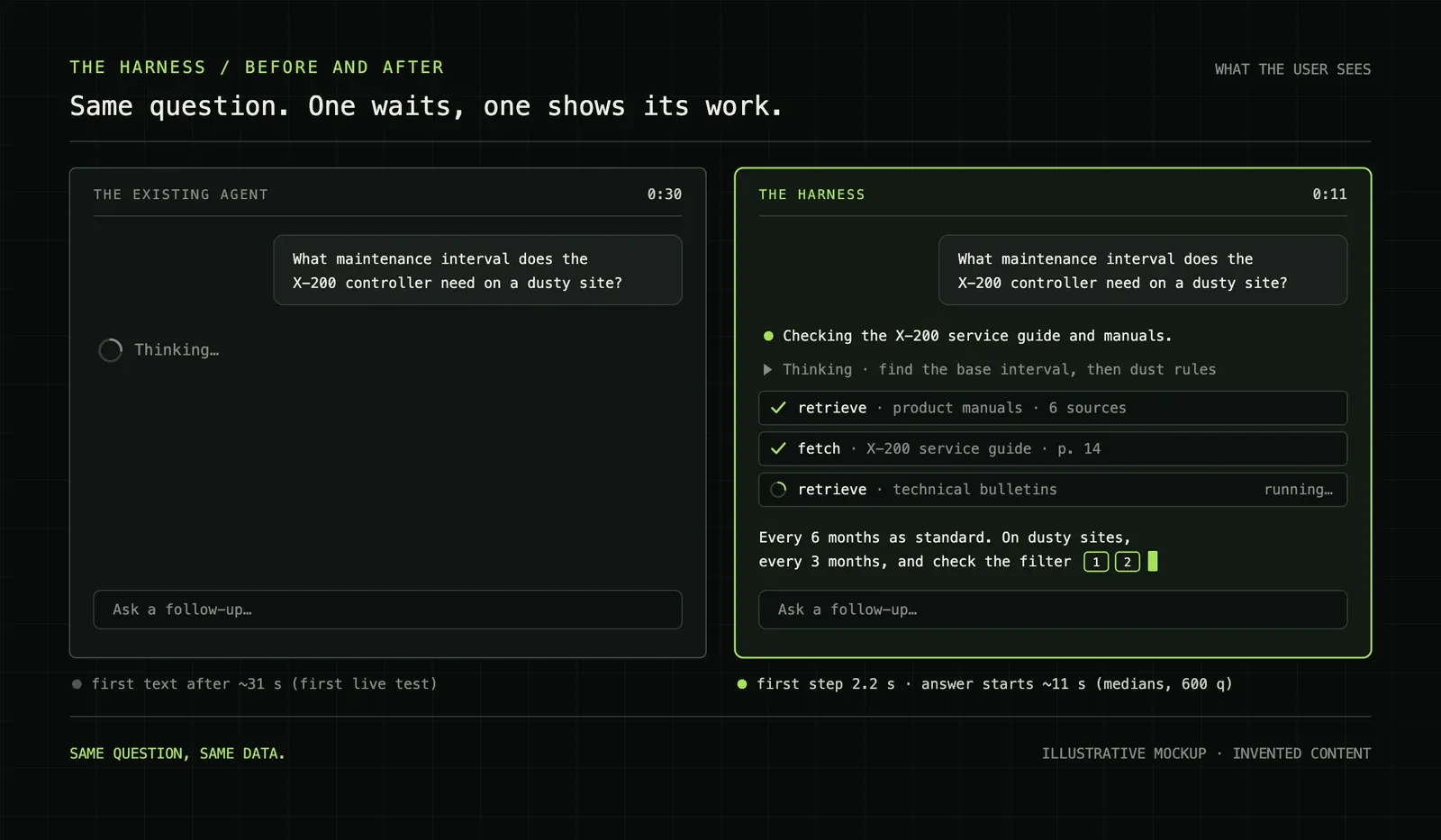
For 31 seconds, the screen said "Thinking…".
That was the median wait before the first word of an answer appeared in the assistant I work on. The agent behind it was searching, reading and reasoning. The user saw a spinner.
The new version shows its first step after 2.2 seconds. It starts writing the answer after about 11 seconds. On 600 test questions, it also scores slightly better than the agent it is meant to replace.
This post is about that new version: my first agent harness. It is the biggest piece of engineering I have done. One pull request added 94,773 lines across 678 files. I built it on my own in about three weeks of working days, spread over a month, with AI agents doing most of the typing. Two teammates helped me finish the last week.
It also lost badly before it won. In its first live test, it passed 30% of the questions from one business division. The old agent passed 65%.
Nobody asked me to build this. The assistant already ran on an agent framework, and it worked. But the strongest agent products I knew were moving to their own harness: a small loop that the team owns end to end. I pitched it to the stakeholders and to management with a specific promise: under a month, on my own, backend and frontend.
That took convincing. A harness was a new idea to the people who had to say yes, and no bonus came with it. I told them plainly why I wanted it anyway: this was the kind of work I wanted my name on.
I kept the promise, but not cheaply. The days were long. In the last week, burnout arrived faster than I expected. That is when two teammates, Marko and Miha, stepped in. They helped a lot with the polishing at the end, and they kept me going when I was running on empty. Neither of them had to. I will always be grateful to both.
A harness is the code around the model
A model turns text into text. It cannot search a document store, call an API or decide that it has enough evidence. The harness is the code around the model that does those things.
A harness decides:
- what the model sees on each turn;
- which tools it can call, and what happens when it calls one;
- when the run must stop;
- what the user sees while the model works;
- what gets stored, traced and checked.
The existing agent is built on Semantic Kernel. Sales and engineering staff use it to answer product and technical questions from company documents and data, and it answers most of them well.
In my first measurements, its median time to first text and its median time to a full answer were the same: 31 seconds. In practice, the user saw nothing until the agent was done.
The wait was the visible problem. It was not the reason I built a harness.
I did not build it because it was faster, or because harnesses were the new thing. I built it because I wanted to see inside.
Our old setup was a black box. From the moment a question went in until the answer came out, I had almost no view of what happened in between.
A harness is the opposite. I own every step, so I can trace every step: what the model is thinking, which tools it calls, what comes back, and where a run goes right or wrong.
Two more things made the case. Compaction means a long chat never hits a wall, so the agent can stay with a harder task for longer. Prompt caching means the stable part of every request is reused, so each turn costs less. Over time, the harness is cheaper, faster and easier to understand.
I had never built an agent loop before. This was my first.
I learned from the open harnesses I could read: Pi and Hermes Agent. While I was building, DeepSeek released its own harness as open source. That was eye-opening. One of the strongest AI labs was shipping the same kind of system I was building, in the same month.
Ours is nowhere near as capable as theirs. But it told me I was building in the right direction. Once their code was public, I read that too.
I did not copy any of them. I took what fit our case and left the rest:
| Project | What I took |
|---|---|
| Pi | Keep the core small: a few tools and a short prompt. |
| Hermes Agent | Small, bounded memory that the agent curates itself. I wrote about that pattern in Agent Memory Is a Write-Path Problem. |
| DeepSeek Harness | Show tool calls as they happen, with the details one click away. |
Before I wrote any code, I wrote a research document: about 9,800 words in 13 sections. It compared options, listed trade-offs, recorded decisions and drafted the first twelve tickets. That document did more for the project than any single line of code.
Set the rules before the first line
The harness had to live next to a product that people use every day. These rules held for the whole month:
- Do not touch the existing agent. It stays live and unchanged. The harness runs beside it.
- Keep new code in its own folders. Shared files change only at named seams. There were 16 of them, and a path check ran before every pull request.
- Ship behind flags, off by default. A beta mode turns the harness on for new chats only.
- Use the same data, sign-in and content filter. A comparison is only fair when everything else stays equal.
- Use no API keys. Managed identity everywhere, and Azure keeps no model responses.
- Budget every run. Turns, time and tokens all have hard limits.
- Measure before claiming. The harness is not better until it beats the existing agent on the same questions.
These rules made a month-long branch possible. They also kept the result honest. When the harness finally won, it won on the same data, behind the same sign-in and through the same filter.
Follow one question through the system
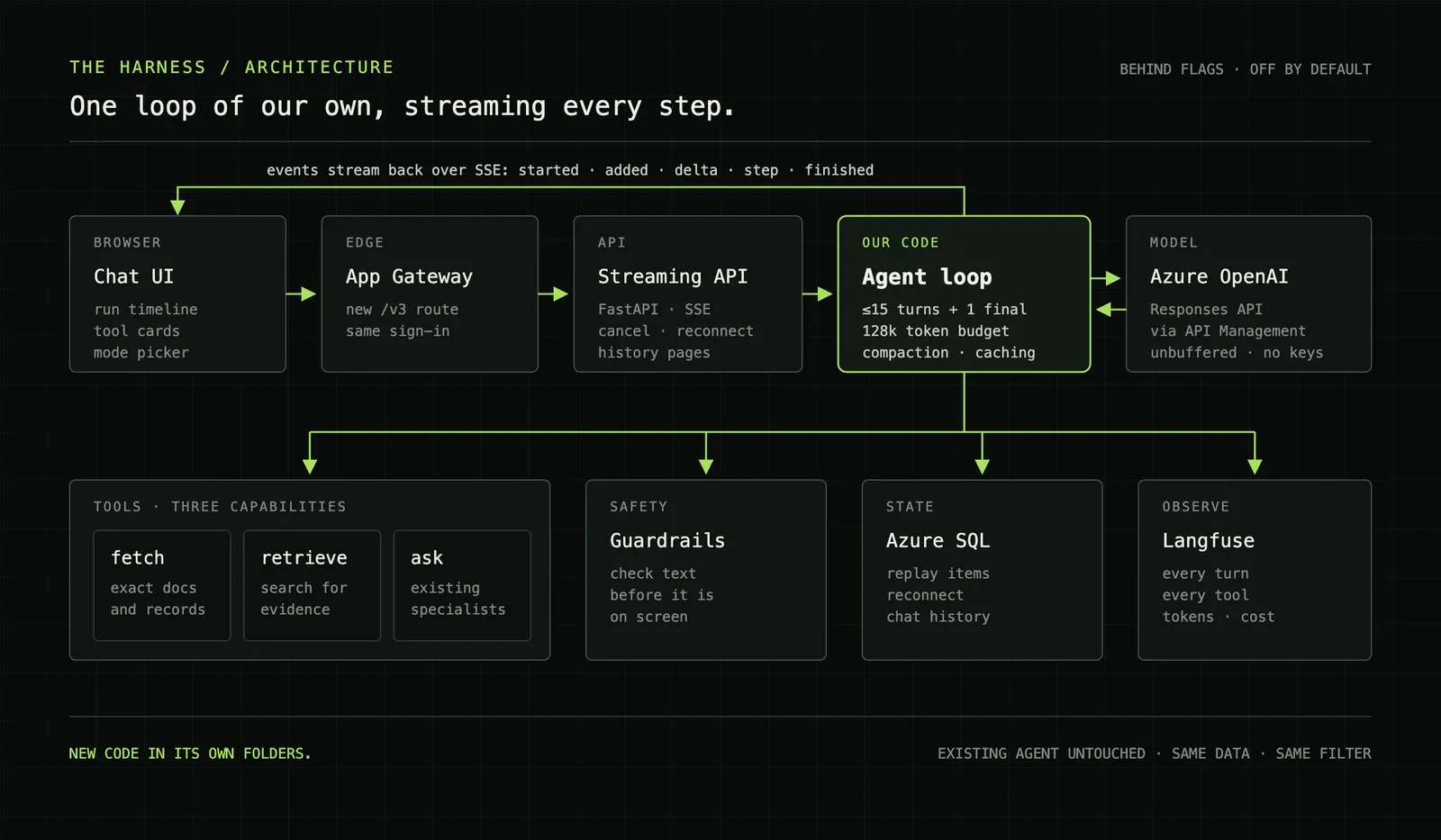
A question takes this path:
| Step | Component | Job |
|---|---|---|
| 1 | Chat UI | Sends the question and renders every event as it arrives |
| 2 | Application Gateway | Routes a new path to the new API, with the same sign-in |
| 3 | Streaming API | A FastAPI service that streams Server-Sent Events, with cancel and reconnect |
| 4 | Agent loop | My code: it builds the model input, runs tools and enforces budgets |
| 5 | Azure OpenAI | The Responses API, reached through API Management |
| 6 | Tools | Three capabilities: fetch, retrieve and ask |
| 7 | Guardrails | Check text before it reaches the screen |
| 8 | Azure SQL | Stores chat state for history, replay and reconnect |
| 9 | Langfuse | Records every turn, tool call, token count and cost |
Most of these boxes already existed. The gateway, the model deployment, API Management, the database and the tracing were there before I started. The new parts were the loop, the streaming API, the guardrails, the chat storage and the frontend timeline.
That was a deliberate choice. Every new system is something to deploy, secure and explain. Reusing existing infrastructure meant the infrastructure change was 17 files and about a hundred lines.
Keep the loop small and bounded
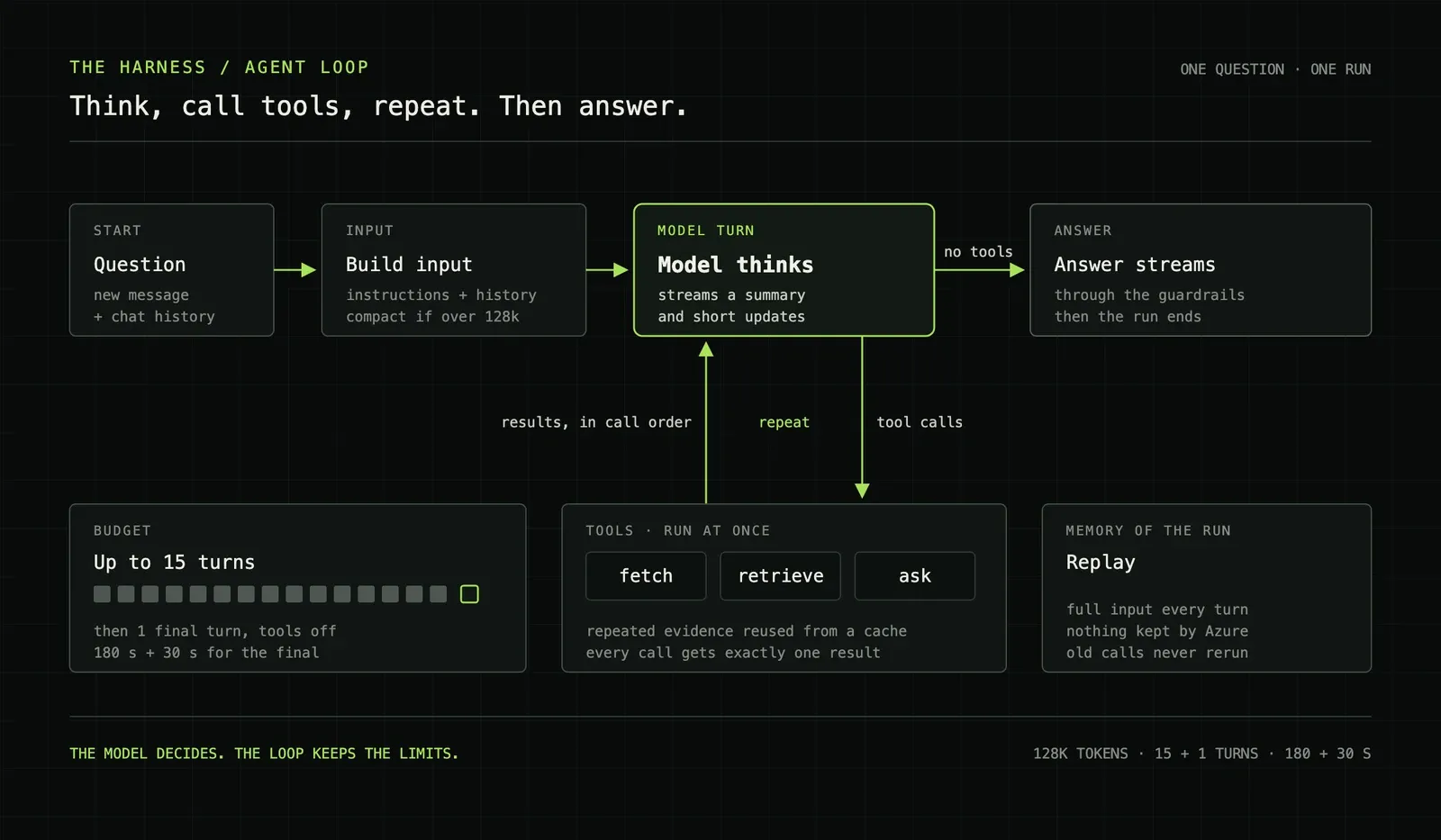
The core of the harness is a loop with four steps:
- Build the model input from the instructions, the chat history and the new question.
- Call the model. It streams a short summary of its thinking.
- If the model asks for tools, run them at the same time, return the results in call order and go back to step 2.
- If it asks for no tools, stream the answer through the guardrails and stop.
That is the whole idea. The work is in the limits around it.
Turns. The model gets up to 15 turns. After that, it gets one final turn with tools switched off. It must answer with the evidence it already has. A run cannot loop forever, and it cannot end without an answer.
Time. The work gets 180 seconds, and the final answer gets 30 more. A slow tool cannot hold a user hostage.
Tokens. The context has a 128k token budget. When a long chat would pass it, older turns are compacted. The model is told that compaction happened, so it knows that earlier details may be missing.
Tools. The model sees three capabilities, not a long list of functions:
| Capability | What the model asks for |
|---|---|
fetch |
An exact document or record that it already knows |
retrieve |
A search for evidence on a topic |
ask |
An answer from one of the existing specialist agents |
Three choices are easy for a model to tell apart. Each capability can grow behind its name without a change to what the model sees. On the full evaluation, the harness averaged 2.4 tool calls per question.
Caching. The prompt is laid out so that the parts that never change come first. The provider can then reuse a cached prefix across turns, retries and the final turn.
Citations. Each tool result carries source IDs that the application issues. The model writes a link to an ID, and the harness turns it into a real document reference. That takes no extra model call, and the sources come from the application, not from the model's memory.
Stream every step, store every step
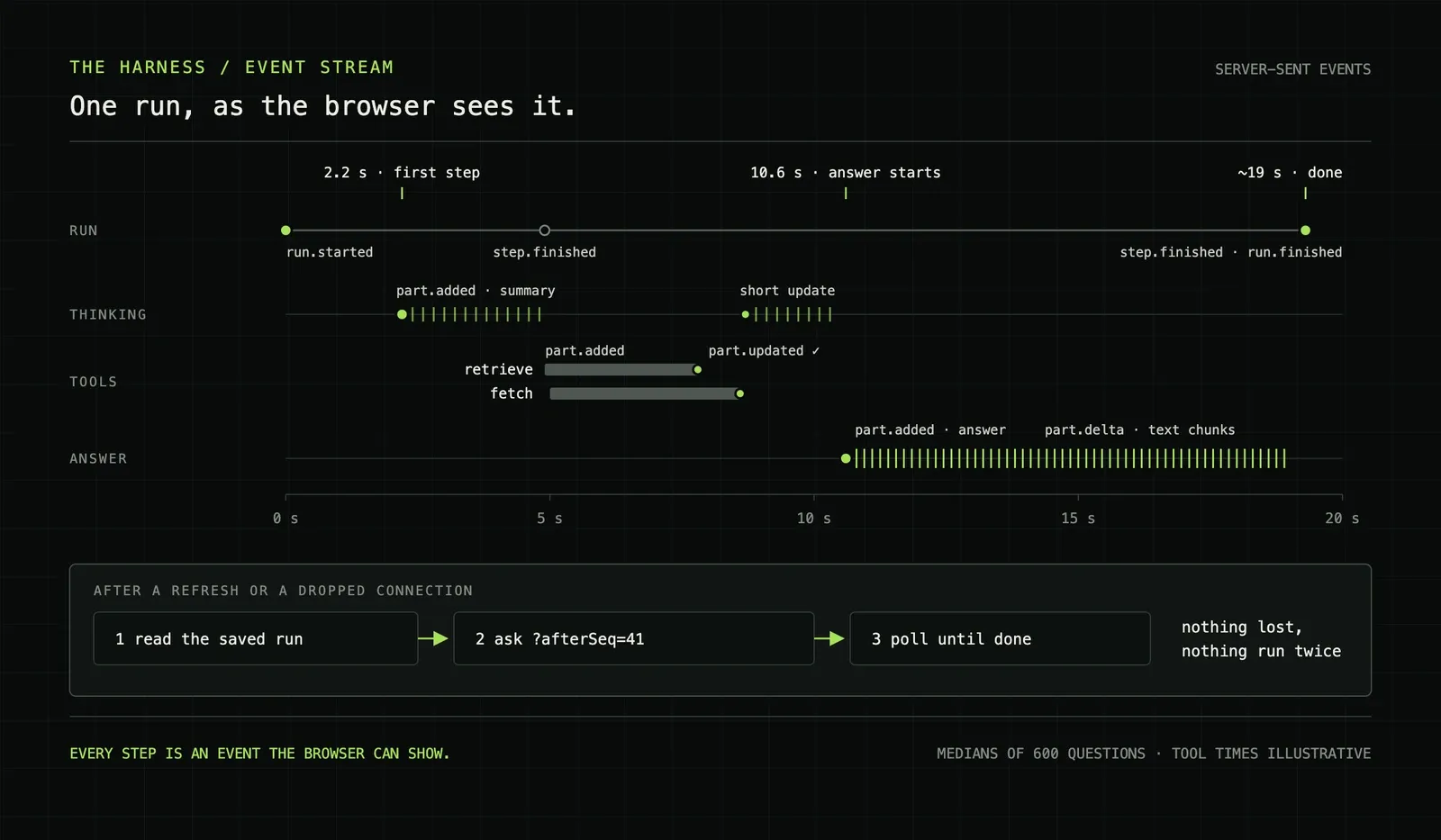
The old agent returned one answer at the end. The harness sends a stream of small events instead:
| Event | Meaning |
|---|---|
run.started |
The run has IDs. From now on, the browser can reconnect to it. |
part.added |
A new part appears: an update, a thinking summary, a tool call or the answer. |
part.delta |
More text for a part. |
part.updated |
A part changed state, for example when a tool call finishes. |
step.finished |
A model turn ended, with its token usage. |
heartbeat |
Keeps the connection open through proxies during quiet stretches. |
run.finished, run.error, run.cancelled |
The run ended. |
The frontend never guesses. It draws what the events say.
Streaming had to work on two legs. The model's tokens had to flow through API Management to my API. My events had to flow through the Application Gateway to the browser. Both layers can buffer a response and release it in one block, which turns a stream back into a spinner. The fix was small: response buffering turned off in API Management, and one path rule at the gateway. Finding it was not small.
Reconnect. A user refreshes the page in the middle of a run. A laptop drops off Wi-Fi. Neither should lose work or run the question twice.
I did not try to replay the event stream. The API saves each public part to Azure SQL as the run goes, with a sequence number. After a refresh, the browser loads the saved message. Then it asks only for the parts after the last sequence number it has, and polls until the run ends.
Each active run holds a lease on its chat. If a server process dies mid-run, the lease expires, and the next read marks the run as failed. Nothing spins forever.
The client also never re-sends a question on its own. If it cannot tell whether a question arrived, it sends the user to the chat history. An unknown outcome is safer than a duplicate run.
Check text before the user sees it
Guardrails are easy when the answer arrives in one piece. You check it, and then you show it.
Streaming breaks that. Once a word is on screen, you cannot take it back.
The harness guard checks the answer while it streams. It holds back the last 600 characters. Before it releases any text, it checks the full answer so far, so every character on screen has passed a check over everything before it. When the answer is complete, the guard checks the final text once more. It also checks before every tool call, so a tool never receives text that failed.
The guard stops internal details, such as tool names and code paths, from leaking into answers. The existing input check and the company's content filter still apply as before.
The cost is small and visible: the last lines of an answer arrive together when the final check passes. That is a fair trade for never showing text that has to be withdrawn.
Show the work, not a spinner
The frontend was a third of the change: 29.4k lines, half of them tests.
The center of it is the run timeline. While the harness works, the user sees:
- short updates in plain language;
- a collapsed summary of the model's thinking;
- a card for each tool call, with what the agent searched for or fetched;
- the answer, streaming with citations.
A tool card shows what the agent asked for. The result loads only when the user opens the card, so a long chat stays light.
Around the timeline, I built a mode picker, a context meter that shows how full the conversation is, and paged chat history. I also did performance work that the timeline made necessary: language files that load only when needed, code splitting, assets moved out of the JavaScript bundle, store selectors that limit re-renders while text streams, and better scrolling while an answer grows.
The before-and-after mockup at the top of this post is the whole frontend argument. The old screen asked the user to trust it for 31 seconds. The new screen shows its work from the second second.
The moment it clicked was the first full run, end to end. I typed a question in the browser and watched every layer I had built answer back: the thinking summary, the tool cards, the answer streaming in with citations. For the first time, all of it was real.
It was rough. But I knew then that the hard part was done. The diamond was already there. What was left was polish, and polish would make it ten times better.
One person, many agents
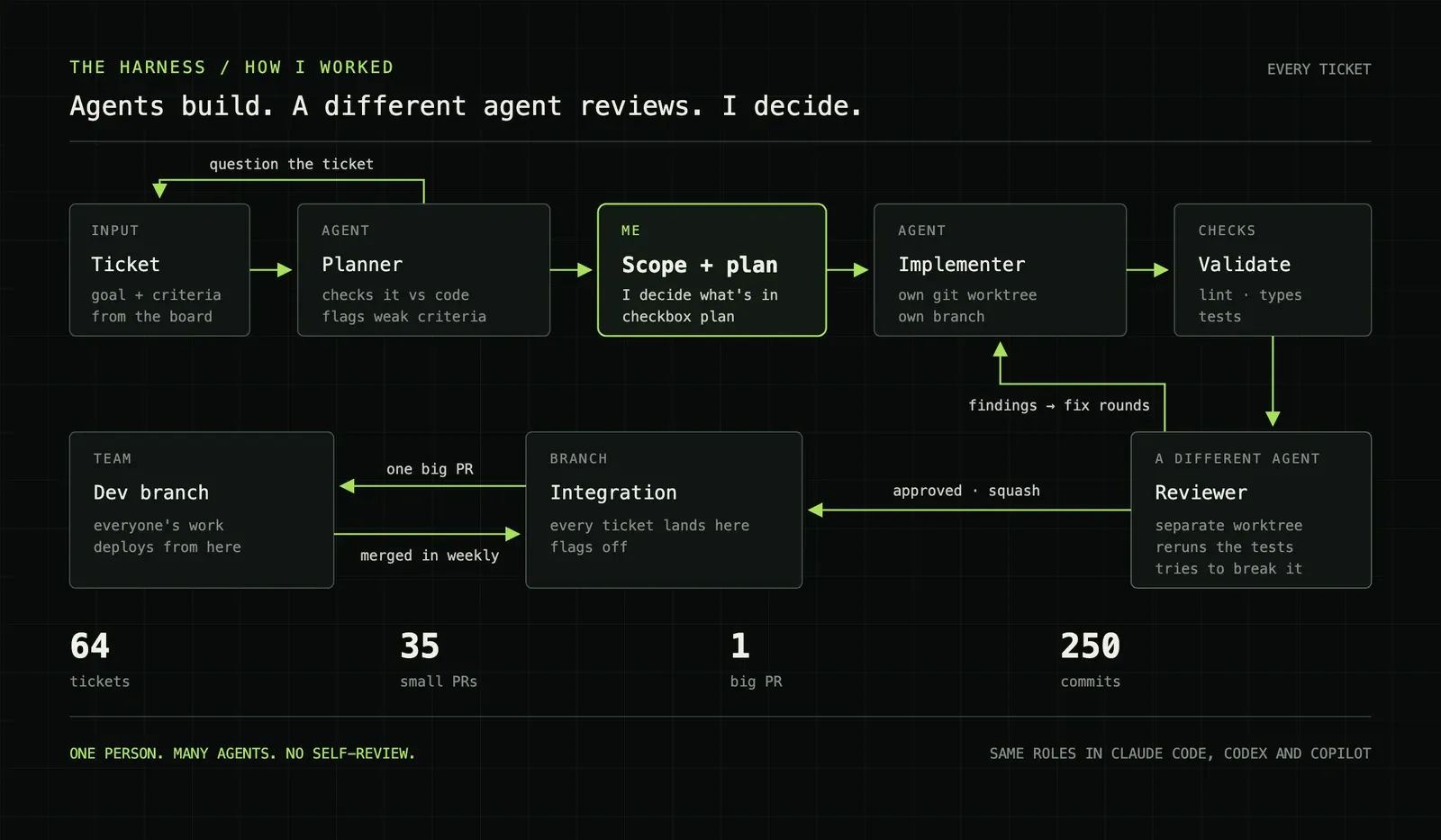
I did not write most of these 94,773 lines by hand. AI coding agents did. My job was to decide what to build, to write plans precise enough for agents to follow, and to keep everything honest.
Every ticket followed the same path:
- Plan. A planner agent checked the ticket against the code. It flagged criteria that were vague, wrong or already done.
- Decide. I made the scope decisions and wrote a plan with checkboxes.
- Build. An implementer agent worked through the plan in its own git worktree and branch. Lint, type checks and tests ran on every change.
- Review. A different agent reviewed the change in a separate, detached worktree. It reran the tests and tried to break the change.
- Fix. Findings went back to the implementer, round after round, until the reviewer approved.
- Merge. Approved work was squash-merged into the integration branch.
The reviewer was never the implementer. An agent that reviews its own work tends to agree with itself.
A separate reviewer earned its place. On the evaluation ticket, the first review round found four major problems: interrupted evaluation attempts that were lost, scorer temp files left outside the private workspace, trace metadata cut short, and a flaky UI test. All four were fixed in the second round. The tracing ticket went through at least three rounds.
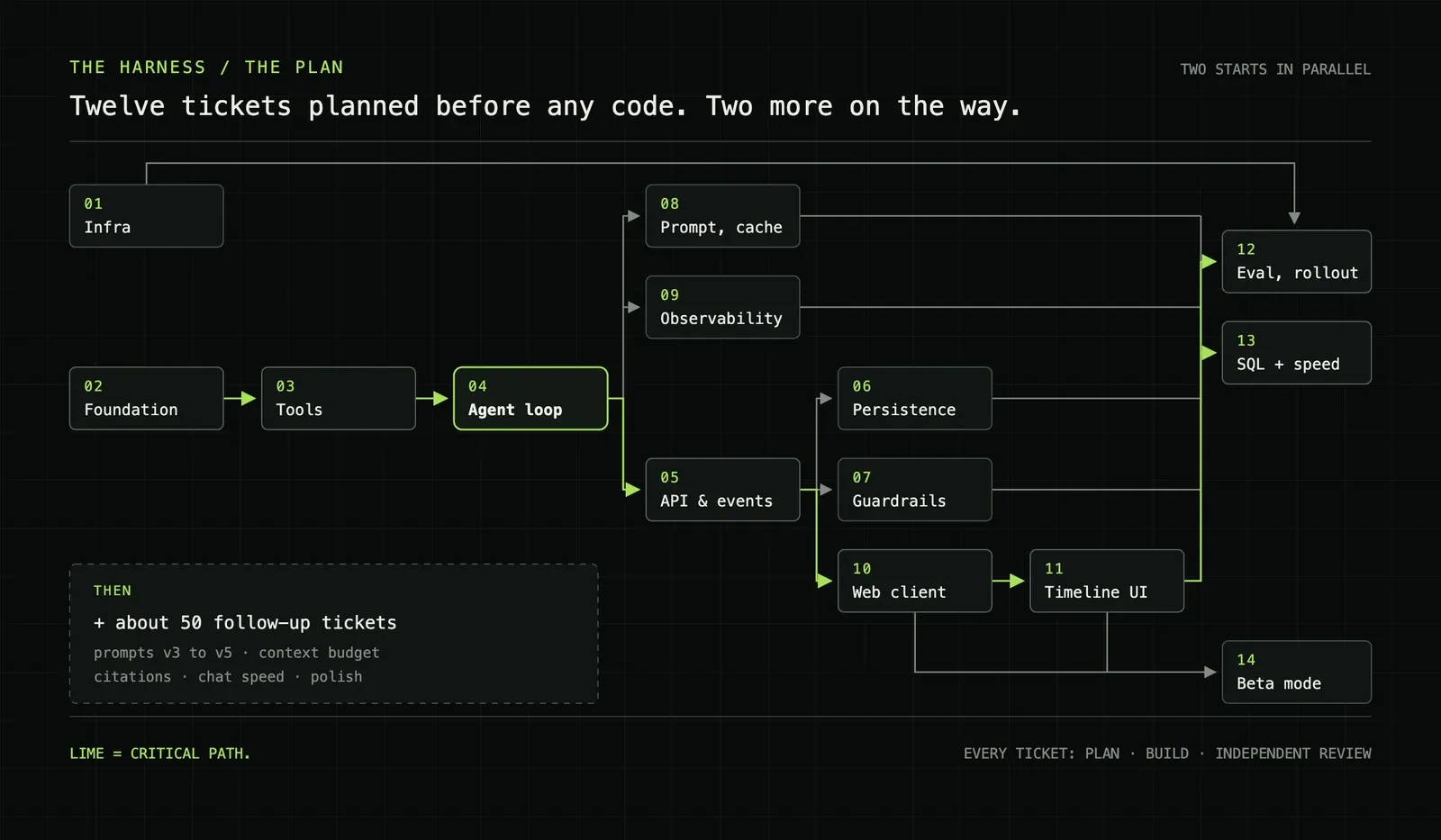
The plan started as twelve tickets with a dependency graph. Two more joined during the build. The first twelve went through the full cycle one after another and landed as one combined change. After that, 35 smaller pull requests went into the integration branch in the last ten days.
By the end, the board held 64 tickets: 48 done, 11 in review and 5 in progress.
One number surprised me: 12.3k lines of the change, 13%, are instructions for agents. Skills, role definitions and folder guides. That is not overhead. It is how the agents knew where the seams were, how to commit and what "done" meant.
I used three tools: Codex, Claude Code and GitHub Copilot. The same roles were defined in all three, so I could move work between them without changing the process.
By the end of the month, one setup had clearly won. Opus 5.5 on high effort planned and reviewed. GPT-6.1 Sol on high effort built. They are the two best models I have used, and nothing else I tried came close. A reviewer from a different model family also does not share the builder's habits.
The tools mattered as much as the models. Codex was the best of the three, then Claude Code. Copilot was clearly behind: the same model gave worse results through it than through its own vendor's tool. That is the argument of this post from the other side. The harness around a model changes what the model can do.
As of November 2026, my subscription ranking is Claude first, then Codex. I would not pay for Copilot.
My days started around 10 in the morning and ended around 1 or 2 at night. Before I went to sleep, I gave the agents work for the night. In the morning, I reviewed what they had done. On the very first night, an independent reviewer agent checked the first two tickets while I slept. During the day, the same loop ran faster.
I chose that pace on purpose. For the first time, I wanted to ship something that would take everything I had, because I knew how proud I would be at the end. I was right about the pride. I was wrong about how long I could hold the pace.
The bottleneck was reading
The hardest part of working with agents was not what I expected. I had a pipeline for catching wrong assumptions, made-up APIs and broken code: plans, tests, type checks and a separate reviewer. That part worked.
The hard part was taking in the context. Before I could approve a change, I had to understand it: what the agent built, what it assumed and why. Most of the time, that meant reading 1,000 to 2,000 lines of code, plus the docs, plus the session history. Then I had to decide, quickly, whether I was confident in it.
The work was not correcting. It was digesting. It was the hardest mental work I have ever done.
It also taught me more than anything else in the project. Some solutions were better than what I would have written, and I had to go and learn something new before I could judge them. Over the month, I learned where a model can be trusted and where to push back. It is like driving a race car: you learn when to accelerate, when to brake, and how fast you can take each kind of corner.
If I did it again, I would hand over more, not less. I lost time reading small functions line by line when only their inputs and outputs mattered. With tests, type checks and a reviewer agent in place, I would now trust those almost blindly, and save my reading for the decisions that shape the system.
My one real complaint: the models love wrapper functions. A new function to wrap one or two lines of code. It works, and it is useless. That is where most of my pushback went.
Lose first, then measure properly
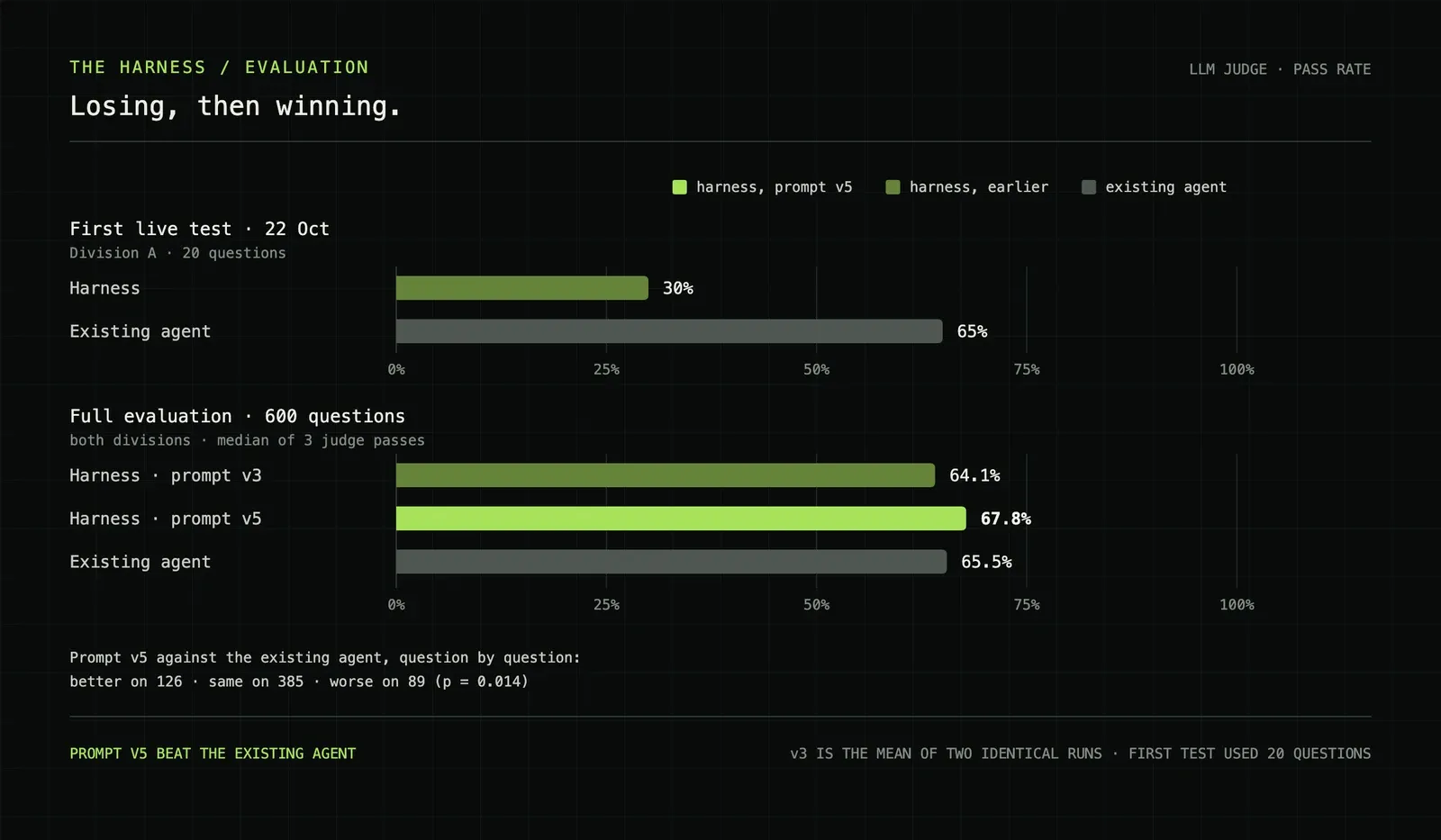
The evaluation set has 600 golden questions with reference answers: 280 from Division A and 320 from Division B. An LLM judge scores each answer from 1 to 5 against the reference. It scores every answer three times, and I take the median. A score of 4 or 5 is a pass. A similarity metric runs alongside as a second opinion.
The first live test used 20 questions from each division. Speed was everything I hoped for:
| Median | Harness | Existing agent |
|---|---|---|
| First text on screen | 3 s | 31 s |
| Full answer | 19 s | 31 s |
Quality was not. In Division B, both agents passed 95%. In Division A, the harness passed 30%. The existing agent passed 65%.
It stung. But I did not expect to win on the first try. Nobody builds something like this right the first time. It takes iteration, and going back and forth until the numbers move. The 30% was not a verdict. It was the next step.
The harder cost was at home. I was neglecting the people I love, and the stress turned into arguments. That did not make me want to stop. It made me want to finish, and finish well. I had bitten off more than I could chew. I chewed it anyway.
The fixes were not clever. I rewrote the prompt three times: v3, a v4 rework and v5. I fixed how the harness handled a few domain terms that the model kept getting wrong. I fixed how product data was shared between tools. And I fixed answers that skipped parts of the question.
Then I learned not to trust one run. I ran prompt v3 on all 600 questions twice, with nothing changed between the runs. The pass rates were 64.2% and 64.0%. That looks stable. But the two runs disagreed on 93 questions. The overall numbers matched only because the disagreements cancelled out.
So a two-point gain from one run could be luck. Prompt v5 had to pass a gate first: in both divisions, its pass rate and mean score could not fall below the v3 baseline by more than run-to-run noise. Cost, tool calls and fetches had to stay inside limits. It passed.
The full result:
| Run | Judge pass | Mean score |
|---|---|---|
| Harness, prompt v3, run 1 | 64.2% | 4.01 |
| Harness, prompt v3, run 2 | 64.0% | 4.01 |
| Harness, prompt v5 | 67.8% | 4.07 |
| Existing agent | 65.5% | 3.94 |
Question by question, the harness with prompt v5 scored higher than the existing agent on 126 questions, the same on 385 and lower on 89. A sign test gives p = 0.014: a split this uneven is unlikely if the two agents are equally good.
By division, the story is less even:
| Division | Harness | Existing agent | p |
|---|---|---|---|
| A (280 questions) | 69.6% | 66.8% | 0.50 |
| B (320 questions) | 66.3% | 64.4% | 0.007 |
In Division B, the harness is better. In Division A, the difference is too small to tell apart from noise. That is a win, not a landslide. I would rather publish it that way than round it up.
It is also cheap and steady. The average model cost was $0.067 per question. In the medium-effort run, all 600 questions completed: one needed a retry, two hit the time limit, and the content filter stopped one.
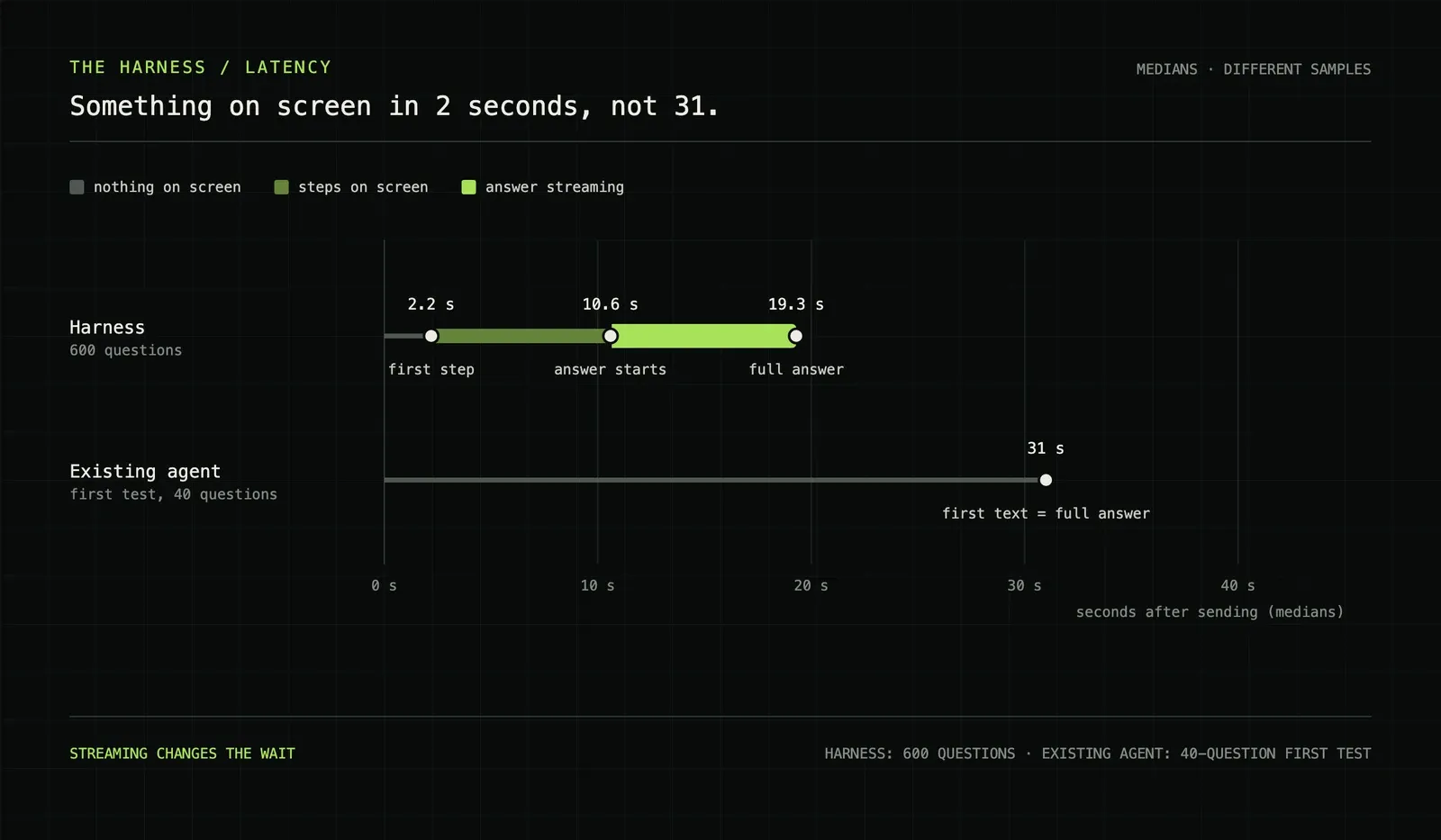
Speed held up at scale. Over 600 questions, the median harness run showed its first step after 2.2 seconds and started the answer after 10.6 seconds. The full answer arrived after 19.3 seconds. The slowest 5% took over 41 seconds, which is the next thing to work on.
One caveat: I timed the existing agent only in the 40-question first test, not on all 600.
More thinking did not help
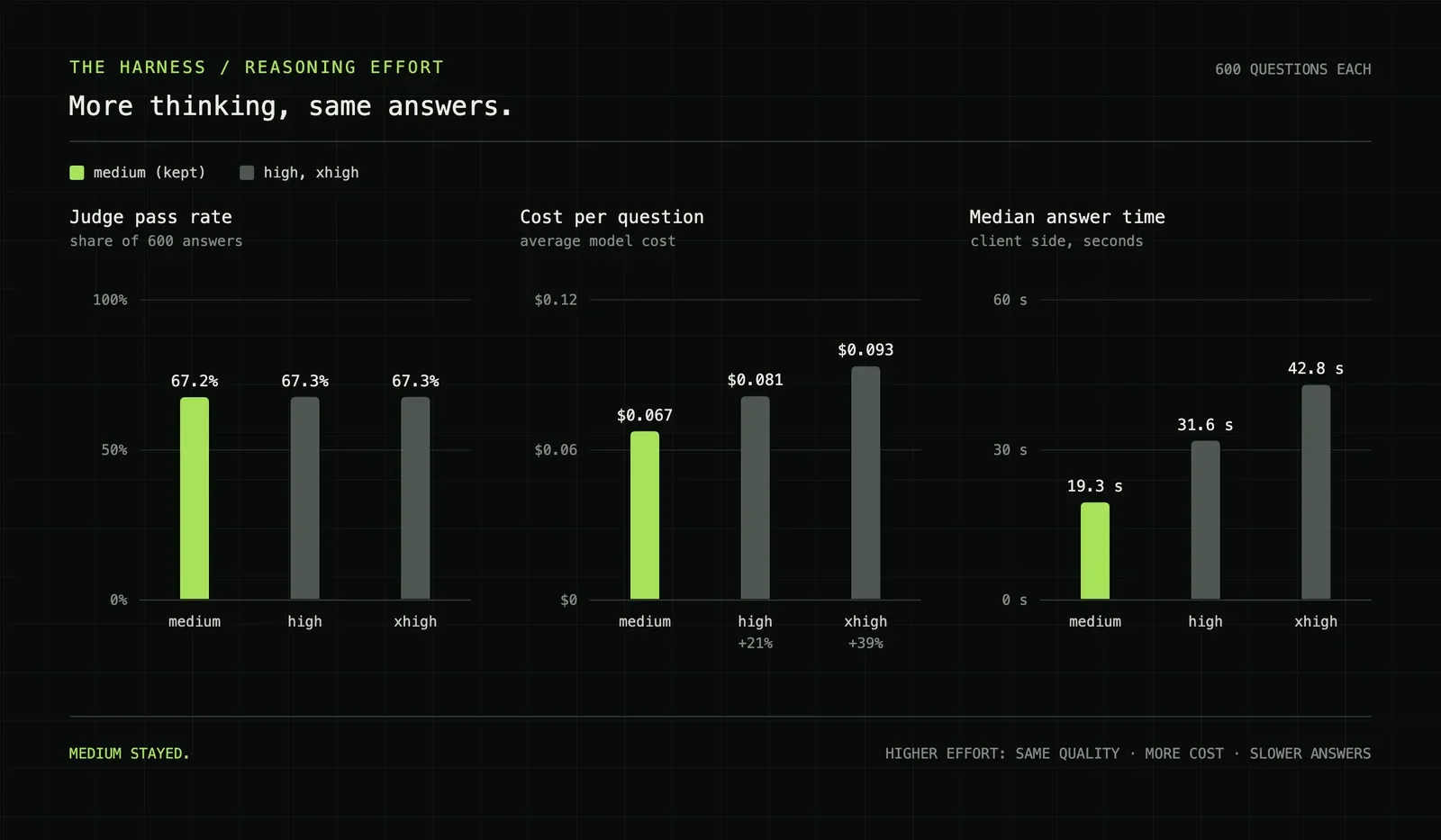
The model has a reasoning effort setting. More effort means more thinking before each step. I ran all 600 questions at three levels:
| Effort | Judge pass | Cost per question | Median answer |
|---|---|---|---|
| medium | 67.2% | $0.067 | 19.3 s |
| high | 67.3% | $0.081 (+21%) | 31.6 s |
| xhigh | 67.3% | $0.093 (+39%) | 42.8 s |
More thinking bought nothing in quality. It cost up to 39% more money and more than doubled the wait. Medium stayed.
These were separate runs from the main comparison, which is why medium shows 67.2% here and 67.8% above. That gap is the same run-to-run noise as the 93 questions.
What was hard
Three things were harder than everything else.
Doing two jobs at once. During the build, Marko went on vacation, and I covered his work: pull request reviews, his tasks, and the security patching he usually owns. It was the worst month for it. Next.js shipped an out-of-band fix for two critical remote code execution flaws. A week later, LiteLLM's own release pipeline published a compromised version, and we use LiteLLM heavily. Every alert like that means stopping, checking what you run and patching it. The harness waited, and the deadline did not move. A one-month promise has no spare week in it.
Losing the first live test. Thirty percent against sixty-five, after weeks of work. The speed was there and the quality was not, and no single clever idea fixed it. The fix took about a week of prompt rewrites and small, unglamorous changes, plus two full runs to learn what noise looks like.
Keeping a month-long branch alive. The development branch did not stand still while I built. I merged it into the integration branch every week, six times, and never rebased: 35 pull requests had been built on that history. Because new code lived only in harness folders, conflicts could only happen at the 16 seams. At the end, the whole thing still had to land as one pull request of 678 files that a human could review and approve.
The rest were hard in the normal way:
- trusting an evaluation when two identical runs disagree on 93 of 600 questions;
- getting a stream through two layers that can each buffer it;
- checking text that is already on its way to the screen;
- reconnecting without losing or repeating work;
- keeping long chats inside a 128k token budget;
- building next to a live product without touching it.
By the numbers
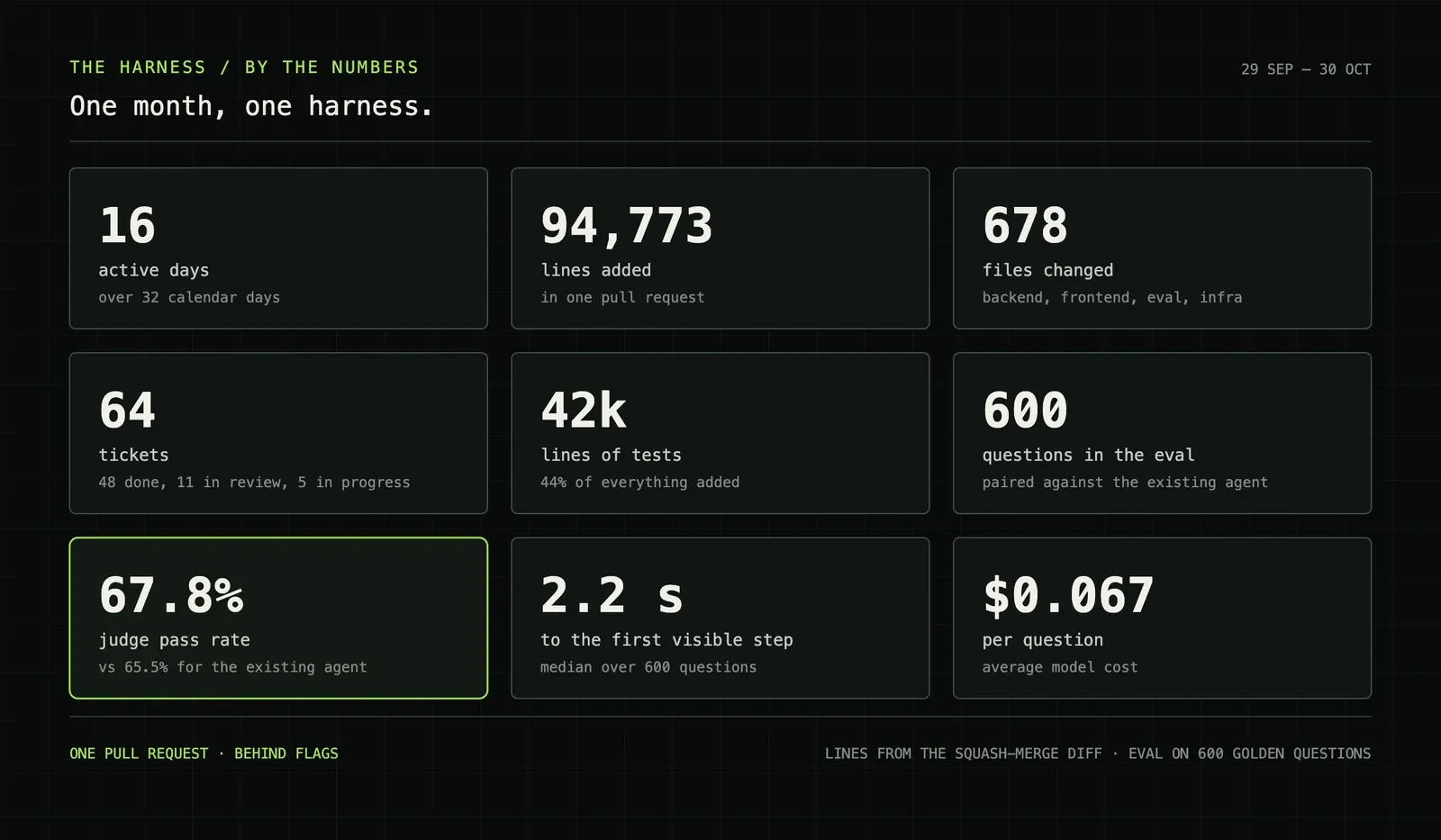
| Measure | Value |
|---|---|
| Lines added in one pull request | 94,773 |
| Lines removed | 3,647 |
| Files changed | 678 |
| Commits | 250, 238 of them mine |
| Active days | 16 of 32 calendar days |
| Tickets | 64 |
| Smaller pull requests into the integration branch | 35 |
| Lines of tests | about 42k, 44% of all lines added |
| Harness tests | 667 API, 266 frontend, 295 evaluation |
| Harness core | 13,950 lines of Python, 6,467 lines of TypeScript |
| Judge pass, 600 questions | 67.8% against 65.5% |
| First visible step, median | 2.2 s |
| Model cost per question | $0.067 |
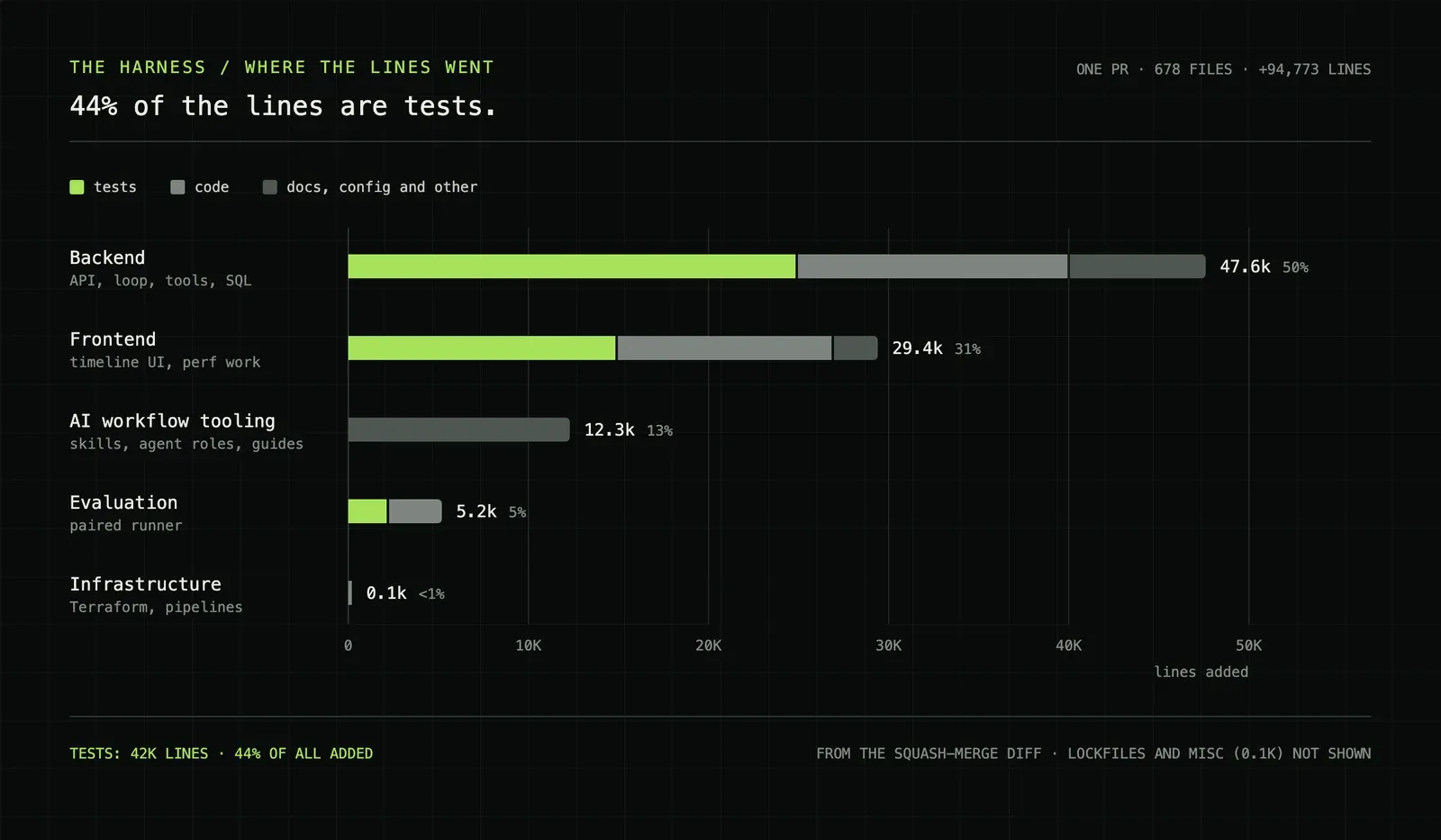
The work was end to end. One change covered infrastructure, backend, frontend, evaluation and the agent tooling:
| Area | Lines added | Share |
|---|---|---|
| Backend | 47.6k | 50% |
| Frontend | 29.4k | 31% |
| AI workflow tooling | 12.3k | 13% |
| Evaluation runner | 5.2k | 5% |
| Infrastructure | 0.1k | under 1% |
Tests are the largest single category. In the backend, there are 24.9k lines of tests for 15.1k lines of code. The agents wrote most of those tests, and a reviewer agent reran them every round. Lines are a rough measure, but this ratio is the part I would keep.
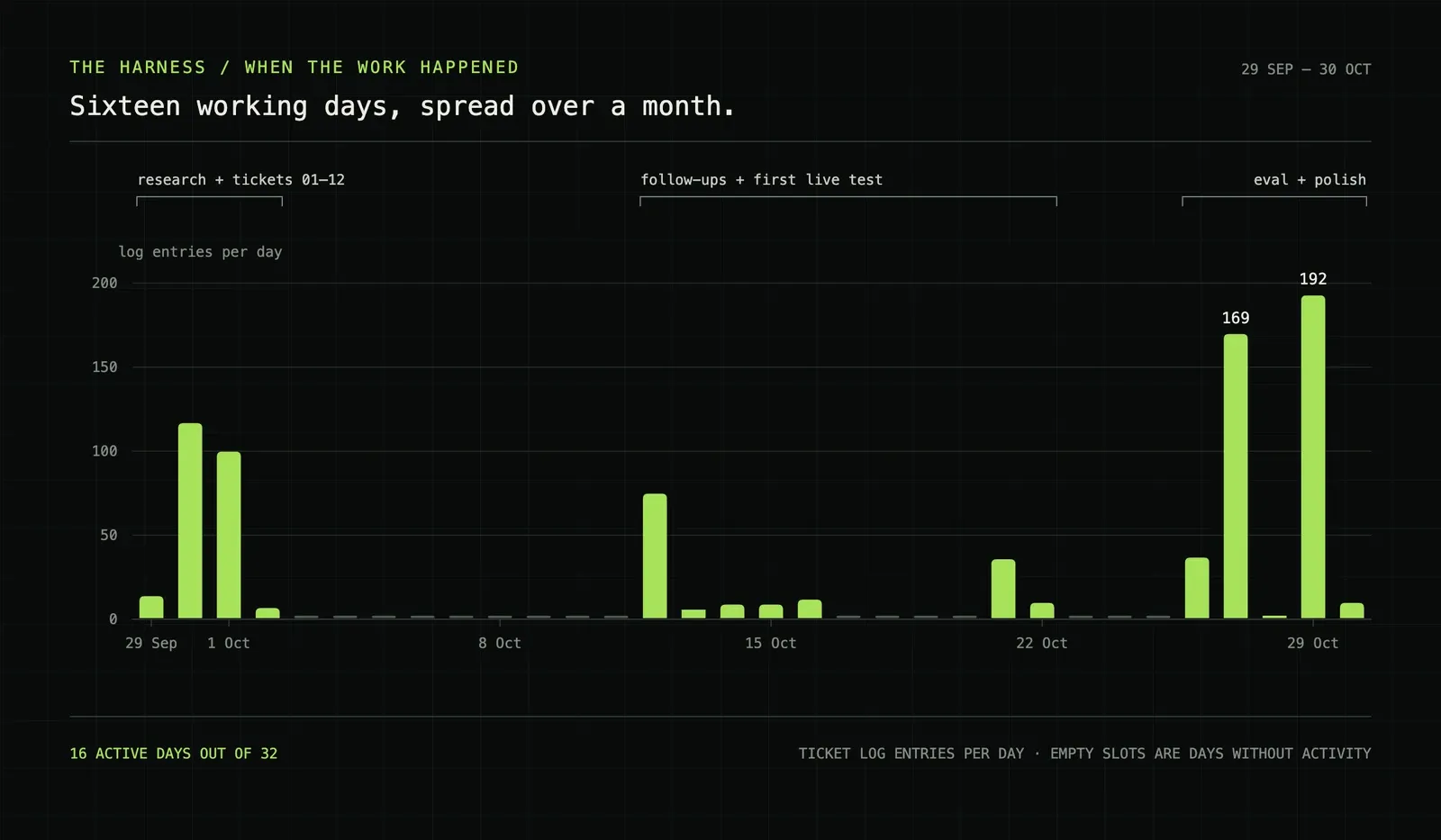
The work came in three bursts: research and the first twelve tickets, then follow-ups and the first live test, then evaluation and polish. The two busiest days were the last week, with 169 and 192 log entries.
The gaps between them were not rest. They were the days I spent covering for Marko and patching our stack.
What I would tell myself on day one
If you are about to build your first harness: it is not easy. You will question a thousand things. The hardest part is the start, until the model runs in a loop with tool calls and you are comfortable with it. Once that skeleton works, everything gets easier. From there, adding features feels like autopilot.
Two habits pay off from the first day. Keep the context as clean as you can. And lay out the prompt so the input cache hits as often as possible. It improves both speed and cost a lot.
And build one, even though it is hard. For an AI engineer, it is close to life-changing.
The rest of what I learned:
Write the research before the code. Thinking on paper first kept me from building the wrong thing quickly.
The plan is the product. Agents follow plans well. A vague plan gets built fast and wrong.
Never let an agent review its own work. Use a different agent, in a different worktree, with a mandate to break things.
Budget for reading, not for writing. Agents write faster than you can understand. How fast you can digest their work is the real limit, so spend it on interfaces and decisions, not on small functions.
Stream from the first day. Users feel latency before they judge quality. A visible step at two seconds changes how the whole product feels.
Budget everything. Turns, time and tokens. Every limit you skip becomes an incident later.
Run the evaluation twice before you believe it. Then compare question by question, not only the headline rate.
Ship next to the old system, behind flags. A month-long branch is survivable when it cannot break anything.
What comes next
The harness merged into the development branch on 30 October, reached the test environment on 2 November, and is now live for real users.
I expect usage to climb, and I expect people to prefer it to the old agent. I have no data for that yet, only a strong belief in what we built. A post that spends this long on honest numbers should not end on a guess. So I will come back with real usage numbers in a follow-up: at the end of the year, or early next year if December is quiet.
The harness in one sentence
Give the model a small, bounded loop, show the user every step as it happens, and do not call it better until 600 questions say so.