
I collected more than 500,000 job records without adding another hosting bill.
That does not mean the whole system was free. I already paid for the VPS, and the proxies cost about €12 each month.
The useful part is not the price tag. It is the architecture.
I used one FastAPI application, local Python processes, and a self-hosted Supabase instance. No Kubernetes. No Kafka. No Airflow.
The result was not a distributed system in the strict sense. It was a single-host scraper supervisor that matched my actual scale.
The Problem
I needed to run many searches across several job boards and countries.
Each search had to move through a list of locations. The system also needed proxies, retries, logs, and duplicate control.
Scrapers fail in boring ways. A request hangs. A proxy leaks the server IP. A library consumes too much memory. A website changes its response.
I wanted failures to stay small and visible.
The first version had room for a task queue and several services. That design adds more parts than the workload requires.
Instead, I kept the control plane and workers on one machine.
One Host, Separate Processes
The FastAPI application serves the dashboard and controls scraper nodes.
Each node is a local scheduler process. The application starts it with subprocess.Popen and records its PID in Supabase.
process = subprocess.Popen(
    cmd,
    stdout=log_handle,
    stderr=subprocess.STDOUT,
    text=True,
    bufsize=1,
    cwd=cwd,
    env=env,
    start_new_session=True,
)
The start_new_session=True option gives the scheduler a separate process session. This separation prevents ordinary terminal signals from reaching it by accident.
It does not make the scheduler independent of the container. All processes still live inside the same Docker container.
If one scheduler exits, the other scheduler processes can continue. The FastAPI application also remains available unless the container itself fails.
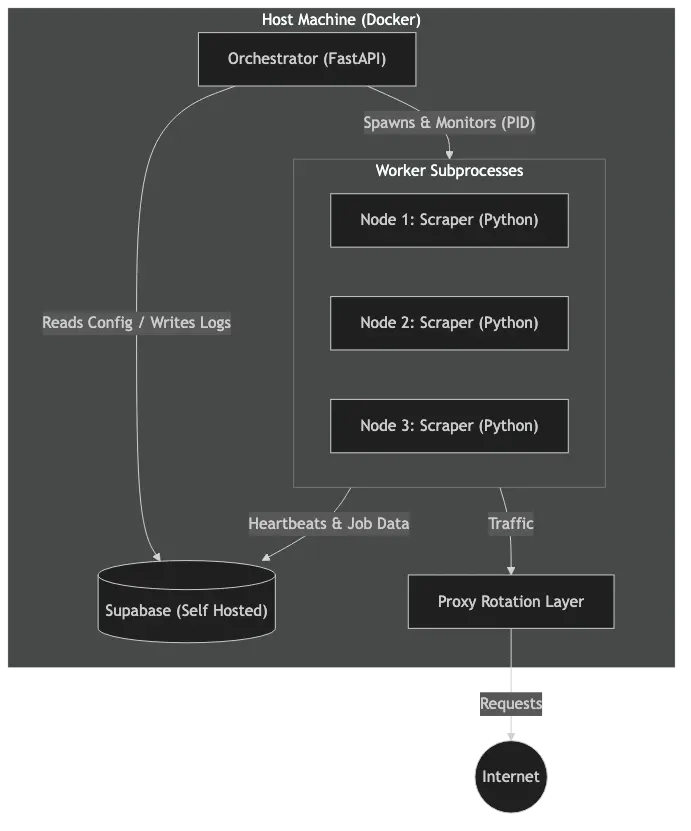
One application controls local schedulers and stores shared state in Supabase.
Supabase as the Coordination Layer
Supabase stores node configuration, status, PIDs, heartbeats, locations, proxies, jobs, and selected log events.
This database state gives the dashboard and schedulers a shared view of the system. I did not need Redis or RabbitMQ for that job.
The database is not a full message queue. It is a practical coordination layer for a small deployment.
At startup, the application compares stored node records with local PIDs and recent heartbeats. It marks dead records as stopped.
It does not search the machine for unknown orphan processes. It also does not kill every existing scheduler during startup.
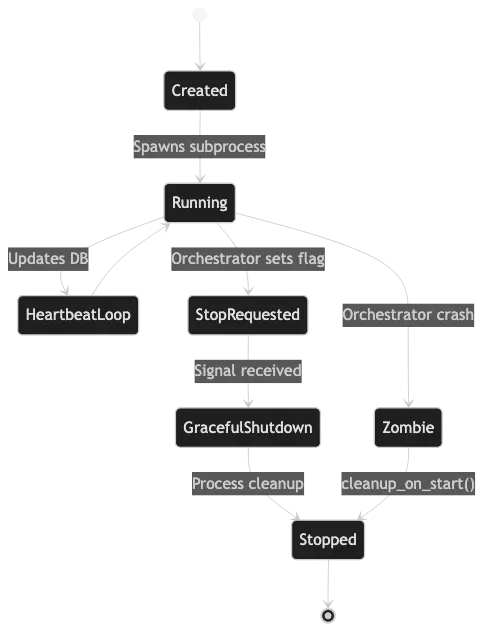
The control plane starts, stops, and records local scheduler processes.
Containing Scraper Failures
Job-board libraries can hang or retain memory between calls. A timeout inside the parent process is not enough.
The current extractor runs each scrape attempt in a fresh multiprocessing.Process. The parent waits up to 420 seconds for a result.
If that limit expires, the parent terminates the child. It uses a hard kill if the child still does not exit.
This is less elegant than perfect memory management. It is also much easier to reason about at 2am.
The scheduler can retry a failed location up to three times. A failed attempt does not require a restart of the whole application.
The application records memory usage before each extraction. It warns when usage is high, but it does not block new work.
That distinction matters. Monitoring a limit is not the same as enforcing it.

Each location passes through proxy checks, extraction, normalization, and upload.
Proxies Before Scraping
The system refuses to scrape without a configured proxy.
Before an extraction, it compares the direct server IP with the IP reported through the proxy. Several public IP services support this check.
If both addresses match, the application rejects the proxy. This check reduces the chance of sending requests from the server IP.
The proxy list comes from Supabase. Credentials come from environment variables, so they do not sit in source control.
The application shuffles available proxies before it calls JobSpy. JobSpy then selects from that list during the scrape.
This is basic proxy handling, not a clever anti-blocking system. The quality and diversity of the proxy pool still determine the result.
Cleaning Imperfect Job Data
Job boards do not return one clean schema.
The extraction layer converts Python dates to ISO strings. It also replaces scalar Pandas missing values with None.
Location handling is intentionally simple. It splits comma-separated values and normalizes a small set of country names.
It is not a general location parser. Strange location strings can still produce strange fields.
The upload layer also normalizes list fields such as skills and email addresses. This work keeps common values compatible with Postgres.
Duplicate Control Without Magic
Repeated searches often return the same jobs.
Before an upload, the application asks Supabase for existing IDs and URLs. It skips known URLs when the incoming job has a new ID.
The final write uses an upsert on the job ID.
This approach removes many repeated records, but it does not guarantee perfect URL uniqueness by itself. Concurrent uploads can still race.
A unique database constraint on the selected URL field closes that gap. The repository documents this constraint, but deployment must apply it.
That is the important rule: application checks improve efficiency. Database constraints protect correctness.
One Jobs Table
I stored the records in one jobs table instead of creating one table for each country or city.
All job records share the same basic shape. Geography changes the values, not the schema.
One table also keeps uploads and cross-country analysis simple.
The database documentation defines indexes for geography, dates, common filters, and full-text search. These indexes must match real query patterns.
I do not have a reproducible benchmark for the old sub-50ms claim. So I am not going to pretend that number means anything.
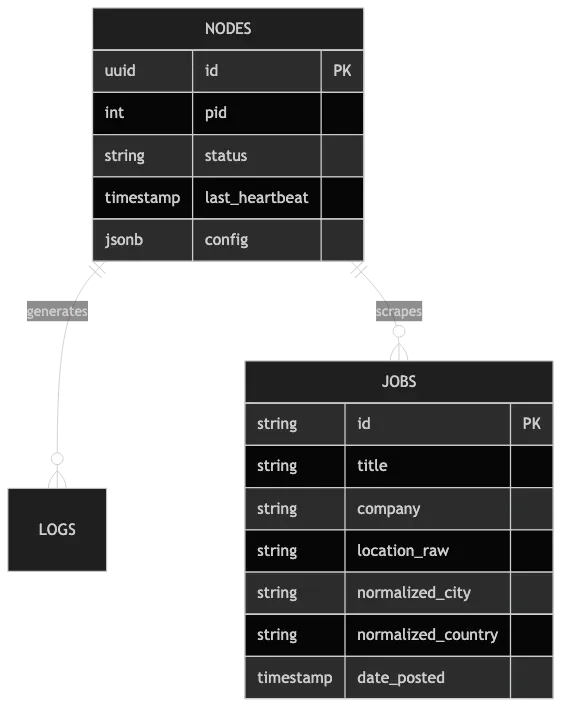
Supabase stores both scraped records and the state of each scheduler.
Heartbeats and Stop Signals
Schedulers write heartbeats while they wait between searches. Other state updates can also refresh the heartbeat.
The dashboard uses the PID and heartbeat to estimate whether a node is alive. It can correct stale database records when it loads node state.
This is not an automatic watchdog. The application does not kill and replace a worker after 90 seconds without a heartbeat.
Long extraction calls also do not send an independent heartbeat. The process timeout protects those calls instead.
To stop a local node, the application sets stop_requested=true and sends SIGTERM to its PID.
It waits ten seconds. If the process remains alive, the application sends SIGKILL.
The database flag still helps schedulers notice stop requests during their normal wait loop.
A Small Control Plane
The dashboard uses FastAPI, Jinja2, HTMX, and a small amount of browser JavaScript.
It can create nodes, start them, stop them, filter them, and show recent state.
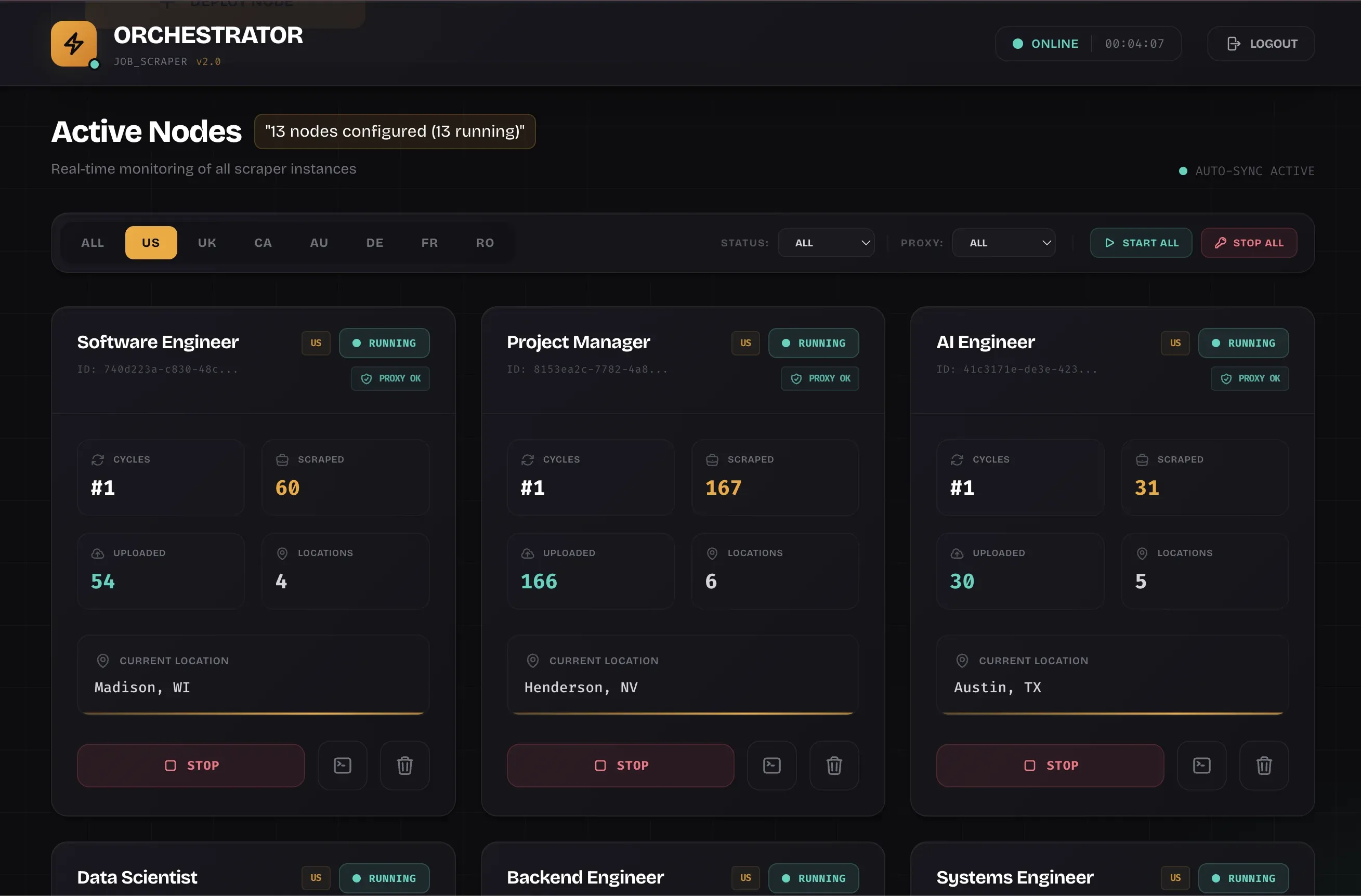
The dashboard displayed 13 configured nodes in this deployment.
The node cards update every five seconds. They show progress such as the current location and the number of jobs found.
The screenshot shows 13 nodes marked as running. It is evidence of dashboard state, not a formal load test.
Creating a Node
The deployment form collects a search term, country, and cycle duration. It then creates a node record and starts the scheduler.
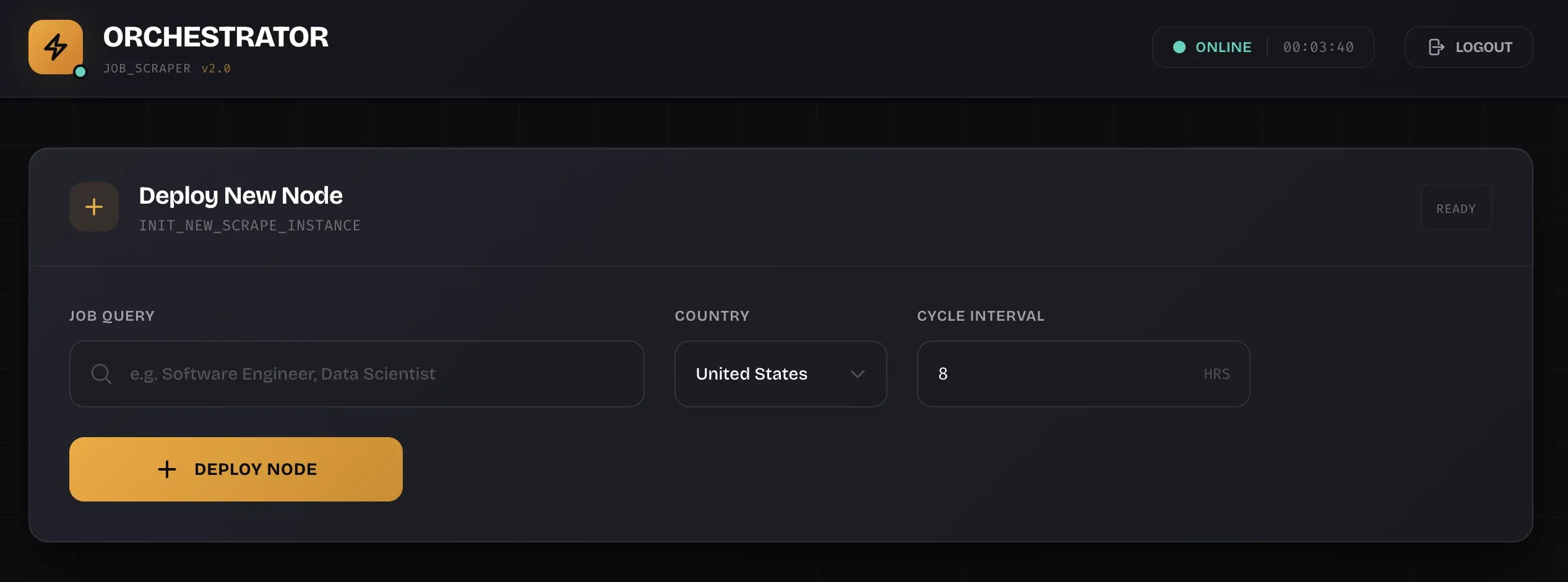
A node combines a search term, country, and schedule.
The target platforms are selected in code, not through this form. The scheduler currently uses LinkedIn, ZipRecruiter, and Google through JobSpy.
Recent Logs
Schedulers write selected events to Supabase. The dashboard loads the latest events when the log panel opens.
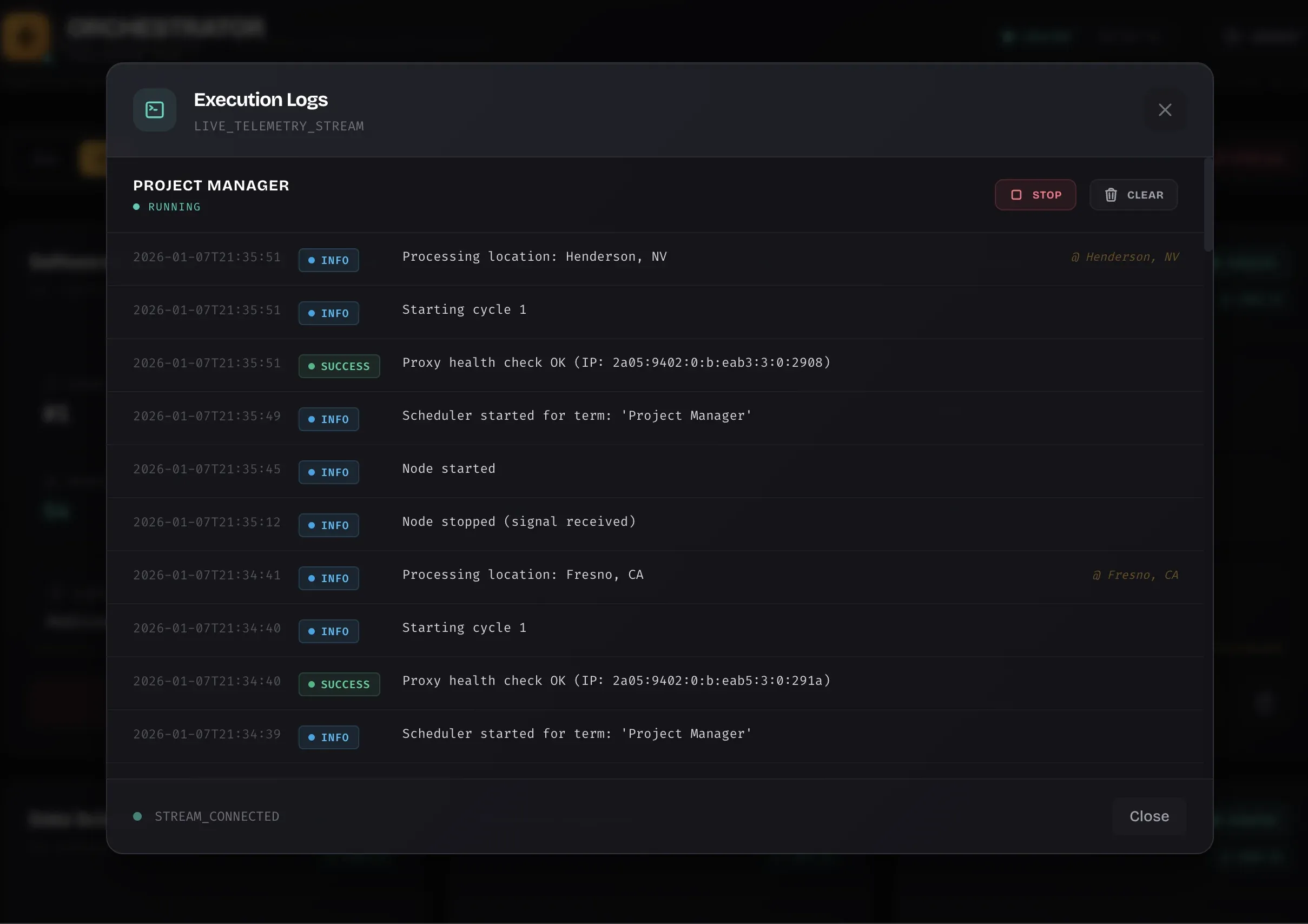
The UI shows recent database events. Full process logs remain on disk.
These logs do not stream continuously. The interface fetches a recent snapshot, while Loguru writes the complete output to local files.
That is enough for routine checks. Deeper failures still require the server logs.
What the System Actually Cost
The application shared infrastructure that I already operated:
- A VPS that already ran other services
- A self-hosted Supabase deployment managed through Coolify
- One Docker container for the scraper application
- Open-source Python libraries
The extra hosting cost was €0 because I already paid for that capacity.
The proxies cost about €12 each month. Calling the complete system free would be dishonest.
The current Docker Compose file gives the application container a shared 2GB memory limit. Scheduler processes do not get separate container limits.
If the container runs out of memory, the control plane can fail with its workers. Process isolation reduces some failures, but it is not magic.
Deployment Is More Than Four Commands
The application itself starts with Docker Compose:
cp .env.example .env
docker compose up --build -d
The dashboard then listens on port 6090 by default.
But those commands are not the full setup.
Supabase must already exist. The database needs its tables, indexes, constraints, locations, and proxy records.
The environment also needs Supabase credentials, UI authentication, and proxy credentials.
Once those dependencies exist, application deployment is small. Provisioning those dependencies is still real work.
The Tradeoff
This design has clear limits.
All schedulers share one machine, one container, and one network connection. The application has no global concurrency limit or automatic worker replacement.
The database coordinates state, but it does not turn local PIDs into a distributed worker system.
Those limits were acceptable for my workload. A larger deployment needs host-aware workers, stronger health checks, and measured capacity limits.
I will add those parts only after the workload proves that they are necessary.
What I Learned
The useful lesson is not that serious scraping costs nothing.
The lesson is that process isolation and a good database can carry a small system surprisingly far.
Use a fresh process around code that can hang. Put correctness rules in the database. Show operational state in a boring dashboard.
Most importantly, describe the system you built, not the system you wish you built.
Build for your scale. Measure the limits. Add complexity when the evidence demands it.